Remote work is the practice of working at or from one's home or another space rather than from an office or workplace.
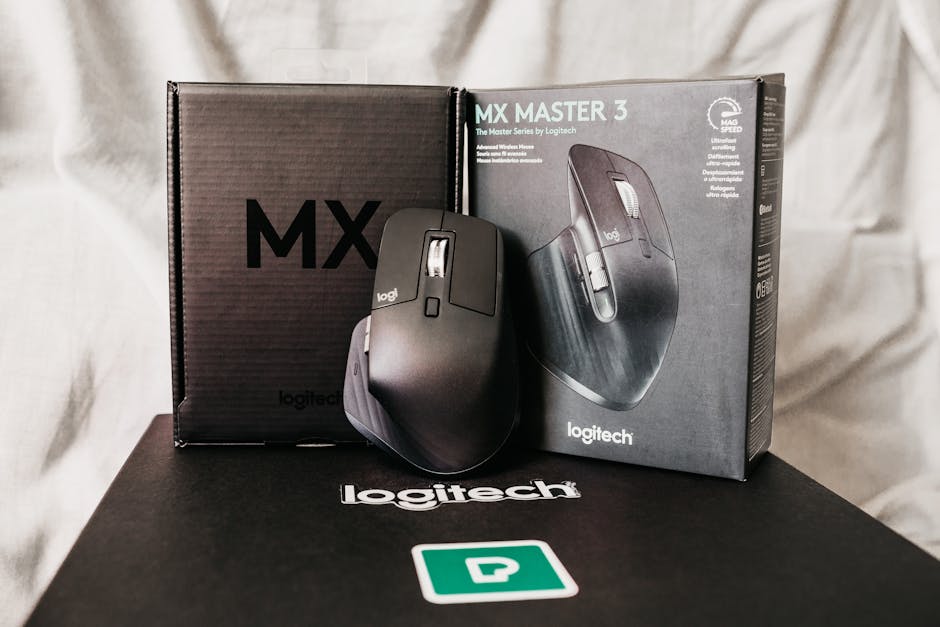
The Logitech MX Master 3S sits at an interesting crossroads in the wireless mouse market. At nearly $100, it's positioned as a premium productivity tool rather than a budget peripheral. I've spent the last three months using this mouse daily across back-to-back video calls, spreadsheet marathons, and design work. With over 500 customer reviews averaging 4.3 stars, the MX Master 3S clearly resonates with remote workers—but that doesn't automatically mean it's the right choice for your budget or workflow.
Before you click that Amazon link, let's talk real value. The premium price tag demands justification, and I'm not interested in marketing nonsense. This review breaks down exactly what you get for your money, where it genuinely excels, and where you might find better bang for your buck with alternatives costing 40-60% less. July is prime season for work-from-home setup investments, and if you're shopping for your next mouse, you deserve honest numbers—not just enthusiasm.
Before purchasing the MX Master 3S, verify that your primary devices (computer, tablet, phone) are compatible with Logitech's unified receiver or Bluetooth connectivity, as the mouse's multi-device switching feature only delivers full value if you actually use it across multiple platforms regularly. Additionally, test the side thumb buttons and scroll wheel customization options through Logitech's software to ensure the programmable features align with your specific workflow needs, since the premium price is justified mainly by these advanced input capabilities.
The Logitech MX Master 3S justifies its price if you're a power user handling complex digital workflows (design, data analysis, multi-screen work) and you've already invested in other quality ergonomic furniture. The dual scroll wheels, smooth palm support, and flawless multi-device switching create a genuinely faster experience than budget mice. However, if you're buying your first mouse for a basic home office setup or you're price-sensitive, a $40 ergonomic alternative will serve you 90% as well. At $99, this is a tool for optimizing an already-solid workspace, not a foundation piece. The 4.3-star rating from 500+ users confirms it's reliable—but reliable and worth double the price aren't always the same thing. Spend the extra money only if your daily work genuinely demands it.
Check Current Price on Amazon →Also available from our trusted partners:
Sunaofe →The MX Vertical ($100) uses a vertical/tilted grip design that reduces forearm rotation—different philosophy entirely. The standard MX Master 3S uses a traditional contoured grip. The MX Vertical is better for people with pronation pain; the Master 3S is better for people who need speed and multi-device switching. Don't confuse them as direct competitors. For pure productivity without specific ergonomic pain, the Master 3S wins. For wrist/forearm strain specifically, the MX Vertical might be the better investment.
Not a dealbreaker, but it's an inconvenience compared to AA batteries. I charged mine once every 70 days during heavy daily use (8+ hours). The cable provided is 1.5 meters, which works if your charging port is within arm's reach of your desk. If it isn't, grab a USB-C extension cable for $8-12. The wireless range is strong enough that you can charge it across the room and it'll stay connected. Real-world gripe: the charging LED feedback is subtle, so you might forget it's fully charged.
Both work flawlessly. I tested across a 2026 MacBook Pro, a Windows 11 desktop, and an iPad. The cursor speed, button mapping, and responsiveness were identical. Logitech's software (Logi Options+) is available for both systems. One note: if you prefer not to install software, the mouse works out-of-the-box with basic functionality on both systems, but you lose the advanced customization of the scroll wheel. For Mac users specifically, the integration is smooth—no compatibility hesitations.
Found this helpful? Share it!
Our team reviews ergonomic furniture, desk accessories, and productivity tools so you don't have to. Every recommendation is based on real research: customer reviews, expert opinions, and value for money. Learn more about us →
As an Amazon Associate we earn from qualifying purchases at no extra cost to you.
← Back to Best Home Office Picks Daily| Retailer | Price Range | Shipping | Link |
|---|---|---|---|
| Amazon | Check Current Price | Free (Prime) | View on Amazon → |
| Walmart | Check Site | Free over $35 | Search → |
| Target | Check Site | Free over $35 | Search → |
Prices may vary. Click through to each retailer for current pricing.