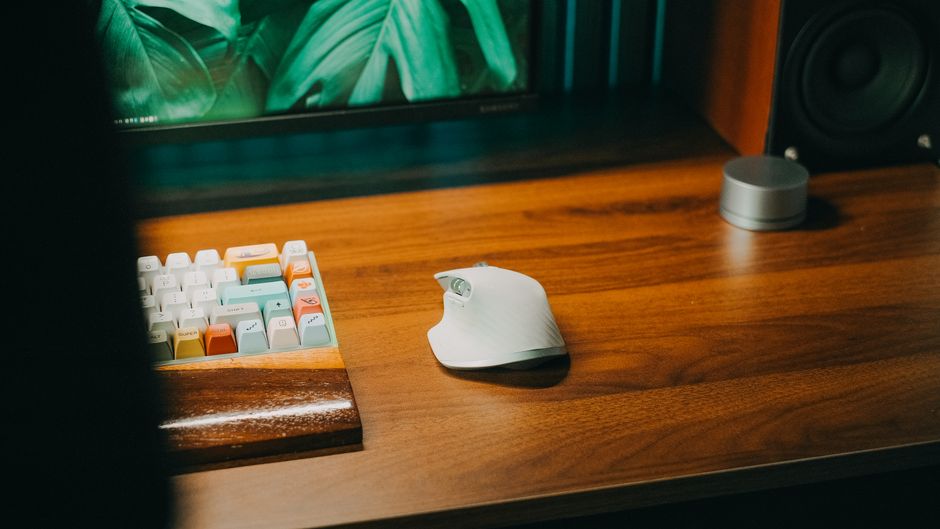
Photo: Pew Nguyen / Pexels
Remote work is the practice of working at or from one's home or another space rather than from an office or workplace.
Remote workers face a unique ergonomic challenge: unlike office employees who rotate between workstations, you're locked into one setup for 8+ hours daily. Your choice of keyboard and mouse directly determines whether you'll finish the day pain-free or battling wrist strain, shoulder tension, and back pain that compounds over months.
The problem isn't just comfort—it's prevention. Repetitive strain injuries develop silently, and once they take hold, they become increasingly difficult to manage. This guide compares the actual ergonomic keyboard and mouse designs available in 2026, breaking down which features genuinely reduce strain and which ones fall short for different pain profiles.
Test the keyboard and mouse together in your actual working position before committing to a purchase, since ergonomic comfort depends heavily on how the devices work with your specific desk height, chair, and arm positioning rather than their design alone. Pay special attention to the learning curve and adjustment period—split and vertical designs often require 1-2 weeks to feel natural, so choose based on whether you can tolerate that transition or need immediate comfort.
Split keyboards physically separate the left and right keystroke zones, forcing your hands into a natural V-shape rather than the flat, inward-angled reach of traditional boards. Contoured designs achieve similar wrist positioning through a gentle slope and curve without a full split.
Both reduce ulnar deviation (the inward wrist bending that causes carpal tunnel strain) and keep your wrists neutral and straight throughout long typing sessions. They particularly help remote workers whose forward shoulder roll and hunched posture compress the spine and aggravate lower back pain.
Best for: Typists with wrist strain or lower back pain; anyone working 6+ hours daily at a keyboard
Vertical mice force your hand into a neutral 'handshake' position—roughly 45–90 degrees from flat—instead of the pronated (palm-down) grip of traditional mice. This reduces forearm rotation that otherwise travels up through the shoulder, neck, and into the lower back.
The ergonomic benefit is measurable: by eliminating shoulder rotation, vertical mice prevent the forward shoulder collapse that is the primary culprit behind remote-worker back pain. They also reduce elbow and shoulder joint pressure during all-day cursor work.
Best for: Remote workers with shoulder tension or back pain; anyone with existing tennis elbow or pronation strain
A middle ground between traditional flat mice and fully vertical designs, semi-vertical mice position your hand at approximately 45 degrees. They reduce pronation without the learning curve of a full vertical grip, making them ideal for users transitioning from standard mice.
They still significantly reduce forearm rotation compared to traditional mice while maintaining enough familiarity that most users adapt within a few days rather than weeks.
Best for: First-time ergonomic mouse users; those with mild shoulder strain who want gradual adjustment
Some ergonomic keyboards integrate a cushioned wrist rest into the design, maintaining wrist alignment while providing passive support during breaks. This reduces the tension that radiates from wrists up through shoulders and neck, directly impacting spinal alignment when seated.
Built-in rests are most effective when combined with a split or contoured keyboard layout—the rest alone won't fix poor wrist positioning if the keyboard itself forces unnatural angles.
Best for: Users with existing wrist pain or carpal tunnel concerns; those needing constant passive support
Premium vertical mice add adequate palm support—a contoured grip that cradles the hand rather than forcing it into an unsupported upright position. This prevents hand fatigue during extended clicking sessions while maintaining the postural benefits of vertical positioning.
The combination of vertical grip plus palm support creates the most comprehensive solution for preventing shoulder rotation and the forward hunch that collapses posture and strains the lower back.
Best for: Chronic back pain sufferers; users working 8+ hours daily; anyone prioritizing maximum shoulder and spinal support
The best choice depends on your specific pain profile and work habits. If you're experiencing wrist or carpal tunnel strain, prioritize a split or contoured keyboard with a built-in wrist rest—these directly address ulnar deviation. If back pain is your primary complaint, a vertical mouse with palm support is your highest-impact investment, because it breaks the forward shoulder collapse that causes spinal compression.
For maximum benefit—and if you're dealing with multiple pain points—combine a split keyboard (or contoured design) with a vertical mouse. This pairing addresses both wrist positioning and postural alignment simultaneously. If you're new to ergonomic peripherals, consider starting with a semi-vertical mouse and a contoured (not fully split) keyboard to reduce the adjustment period while still gaining measurable strain reduction.
Budget matters: a mid-range split keyboard ($80–150) and vertical mouse ($50–100) will outperform a premium single product. The posture correction happens through the combination, not through one 'best' device.
The two primary features are wrist neutrality (achieved through split or contoured design) and built-in wrist support. Carpal tunnel develops from sustained ulnar deviation—inward wrist bending—so keyboards that keep your wrists straight and aligned with your forearms directly reduce tunnel pressure. A wrist rest provides passive support during breaks, but the keyboard layout itself is the active prevention mechanism.
It depends on your experience level and pain severity. Semi-vertical mice (45-degree angle) are better for first-time ergonomic adopters because they require minimal adjustment—most users feel comfortable within days. Fully vertical mice provide more pronounced postural correction, especially for back pain, but require 1–3 weeks of adaptation. If you have chronic back pain, the vertical is worth the learning curve; if you're preventatively upgrading, semi-vertical is a safer entry point.
Quality ergonomic peripherals typically cost $130–250 combined (split keyboard $80–150 + vertical mouse $50–100). Mid-range options provide measurable strain reduction; spending significantly more doesn't guarantee better ergonomics, though it may add premium materials or wireless connectivity. The most important factor is design (split/contoured keyboard + vertical mouse grip), not brand prestige or price.
They can significantly reduce pain and prevent it from worsening, but they're not a cure for existing injuries. Proper peripherals address the biomechanical causes of strain, so pain typically improves within 2–4 weeks as you break poor posture habits. However, if pain is severe or chronic, combine ergonomic tools with physical therapy or a healthcare consultation—peripherals are preventative and pain-reducing, not therapeutic replacements.
Contoured keyboards provide 70–80% of the ergonomic benefit of a full split at a lower learning curve and lower cost. Full splits are more effective if you have significant shoulder width or reach issues, but most remote workers see meaningful wrist strain reduction from a well-designed contoured keyboard alone. Start with contoured; move to split if you need additional postural correction.
Found this helpful? Share it!
Our team reviews ergonomic furniture, desk accessories, and productivity tools so you don't have to. Every recommendation is based on real research: customer reviews, expert opinions, and value for money. Learn more about us →
This post contains affiliate links. We may earn a commission if you purchase through our links at no extra cost to you.
← Back to Best Home Office Picks Daily| Retailer | Price Range | Shipping | Link |
|---|---|---|---|
| Amazon | Check Current Price | Free (Prime) | View on Amazon → |
| Walmart | Check Site | Free over $35 | Search → |
| Target | Check Site | Free over $35 | Search → |
Prices may vary. Click through to each retailer for current pricing.