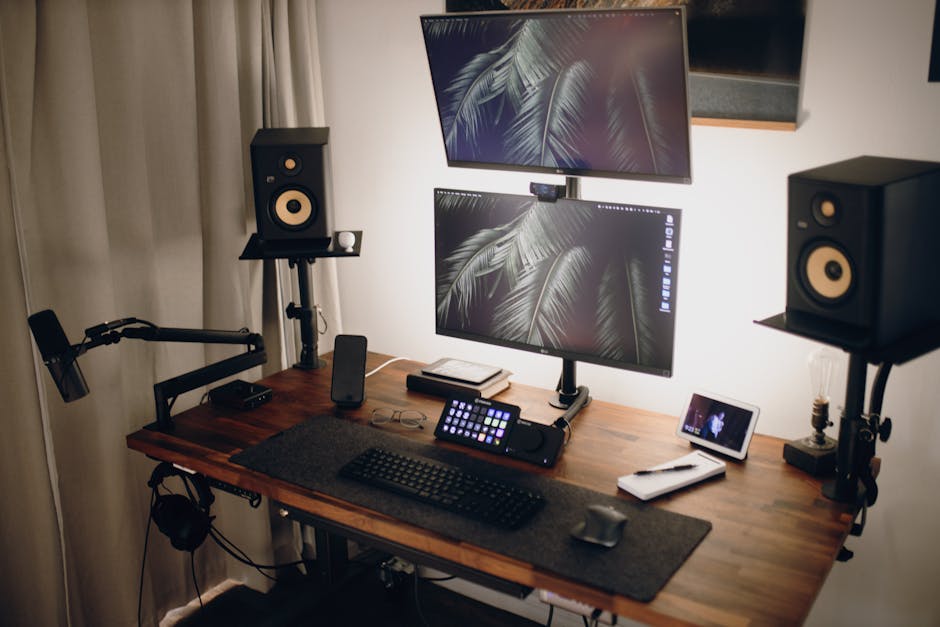
Photo: Josh Sorenson / Pexels
Remote work is the practice of working at or from one's home or another space rather than from an office or workplace.
If you've invested in a standing desk, you're already halfway there—but most standing desk setups fail because they're missing one critical piece. The problem isn't the desk itself; it's that people treat all standing desk accessories as interchangeable. They're not.
A monitor arm solves one specific problem: neck strain and posture. An under-desk storage system solves another: keeping frequently used items within arm's reach without creating surface clutter. A desk organizer handles vertical space utilization. A desk riser elevates monitors or laptops to the correct height. A keyboard tray manages wrist angle and arm position. An anti-fatigue mat reduces leg and foot pain during long standing sessions.
When choosing between monitor arms and storage solutions for a standing desk setup, prioritize a monitor arm first since proper screen height and positioning directly prevents neck and back strain during long work sessions, then add storage organizers only if your desk surface allows adequate clearance for sitting and standing transitions without obstruction.
This guide compares the major accessory categories—what each actually does, who needs each one, and how to avoid buying the wrong thing for your workspace.
A quality monitor arm mounts to your desk and allows your monitor to move fluidly between sitting and standing heights. The best options use gas spring mechanisms rather than friction-based systems, which means dozens of daily adjustments feel effortless instead of like a chore you'll skip. Look for VESA compatibility (usually 75x75 or 100x100) and verify the arm's weight capacity exceeds your monitor's weight—an 8 lb monitor on a 10 lb capacity arm will eventually sag.
Clamp-based mounting (rather than through-desk bolts) is critical if you rent or want to avoid permanent desk damage. Full range of motion without resistance is the key differentiator between a monitor arm that you'll adjust 20+ times daily versus one that sits in one position because adjusting it is annoying.
Best for: Anyone experiencing neck strain, forward hunching, or eye fatigue from monitor height misalignment. Essential if you switch between sitting and standing positions throughout the day.
Under-desk storage keeps supplies within arm's reach without consuming your valuable desk surface area. The critical specification is height clearance—storage must be no taller than 12 inches and have open or recessed design to avoid interfering with leg room or chair wheels. Poor placement actually reduces ergonomic benefits and creates workflow disruptions.
Modular or adjustable shelving lets you reconfigure as needs evolve without repurchasing. The goal is creating a productivity powerhouse by keeping most-used items accessible while maintaining the ergonomic benefits of standing—if storage forces awkward reaching or bending, you've chosen wrong.
Best for: People with cluttered desk surfaces who need reference materials, office supplies, or equipment stored but accessible. Anyone in a small workspace where vertical or under-surface storage is the only option.
Desk organizers maximize vertical space utilization by stacking upward rather than spreading outward. Wall-mounted shelves, vertical file holders, and tiered desk risers keep frequently-used items (pens, notepads, phone) at eye level or within your natural arm's reach (12-18 inches from your body). The real value comes from choosing organizers with integrated cable channels or sleeves that keep monitor/keyboard/charger cords hidden.
Without cable management built-in, even the best organizer becomes a focal point of visual clutter that kills focus. Less-used items go higher or lower on your workspace, but the most important principle is that standing-desk organizers must respect arm's reach distances or they actually slow you down.
Best for: Anyone with a cluttered standing desk surface who needs to keep tools and supplies visible but organized. Best for people who have limited wall space but plenty of vertical space on the desk itself.
A desk riser sits on top of your standing desk and raises your monitor or laptop to the correct eye level, especially important if your standing desk's surface height doesn't accommodate standard monitor positioning. The adjustable height mechanism must be rock-solid stable—wobbly risers break focus and risk equipment damage. A wide, weighted base and smooth adjustment mechanism that holds position without slipping are non-negotiable.
Like monitor arms, cable management integration is critical; choose risers with built-in cable trays or routing channels. The key difference from a monitor arm: a riser is a stationary platform, while a monitor arm allows full range of motion between sitting and standing positions. Some setups use both.
Best for: Renters or people who can't install a monitor arm due to desk type. Anyone whose standing desk surface height doesn't naturally position monitors at eye level. Better for static setups than for frequent sitting-to-standing transitions.
An anti-fatigue mat cushions your feet and reduces impact during prolonged standing, addressing one of the overlooked pain points of standing desks: leg and foot fatigue. The mat should fit within your standing desk's footprint without creating tripping hazards. Quality mats have enough cushioning to absorb impact but enough firmness to support your weight without creating an unstable standing surface.
This is not a productivity tool in the traditional sense, but it directly enables longer productive standing sessions—without a mat, many people abandon standing desks after a few hours due to foot pain, defeating the entire purpose of the investment.
Best for: Anyone standing for 4+ hours daily who experiences foot, leg, or lower back pain. Essential if you're transitioning from a primarily sitting setup to a standing or hybrid setup.
The best standing desk setup isn't about buying the most accessories—it's about solving your specific problems in order. Start with the monitor arm if you experience neck strain or eye fatigue (this is the most common issue). Add anti-fatigue mat support if you're standing 4+ hours daily. Only then move to storage and organizers if you have surface clutter that's actually slowing you down.
If you're renting or can't install a monitor arm, a desk riser with adjustable height is a legitimate alternative, though it won't give you the full range of motion. For cable management, prioritize accessories with built-in channels over buying separate cable clips—the difference in focus is measurable. If your standing desk already has good monitor positioning and cable management, you may not need anything beyond an anti-fatigue mat.
The common failure pattern is buying organizers and storage first (because they're visible and feel productive), then wondering why the setup still causes neck pain or foot fatigue. Solve ergonomic problems first, then optimize organization.
Not necessarily. A monitor riser is sufficient if your standing desk is your primary work surface and you rarely switch between sitting and standing. If you alternate positions throughout the day, a monitor arm with gas spring mechanism is worth the extra investment because manual adjustment of a riser becomes a friction point you'll skip.
Get at least 5 lbs more than your monitor weighs. An 8 lb monitor needs a 13+ lb capacity arm, not a 10 lb rated arm. The extra capacity prevents sagging over months of use and accommodates future monitor upgrades without repurchasing.
Maximum 12 inches, and only if it has recessed or open design. Anything taller interferes with leg room and defeats the ergonomic purpose of standing desks. Measure your actual clearance before buying—standing desk frames vary, and a storage unit that works for your coworker might not fit yours.
It's necessary if you stand more than 2-3 hours daily. The mat doesn't give you superpowers, but it reduces foot and leg fatigue enough that you'll actually maintain the standing habit long-term instead of reverting to sitting. Without it, many people abandon standing desks because the pain isn't worth the posture benefit.
Yes. Cable clutter directly impacts focus and decision-making speed. Choosing accessories with built-in cable routing channels costs slightly more upfront but eliminates the need to buy separate cable management products later. It's one of the highest ROI choices you can make.
Found this helpful? Share it!
Our team reviews ergonomic furniture, desk accessories, and productivity tools so you don't have to. Every recommendation is based on real research: customer reviews, expert opinions, and value for money. Learn more about us →
This post contains affiliate links. We may earn a commission if you purchase through our links at no extra cost to you.
← Back to Best Home Office Picks Daily| Retailer | Price Range | Shipping | Link |
|---|---|---|---|
| Amazon | Check Current Price | Free (Prime) | View on Amazon → |
| Walmart | Check Site | Free over $35 | Search → |
| Target | Check Site | Free over $35 | Search → |
Prices may vary. Click through to each retailer for current pricing.